Skip to content

vLine

WebRTC for mobile and group conferencing

Packed into Yelp headquarters on Wednesday, October 9, attendees of San Francisco’s HTML5 Meetup heard our CEO and co-founder, Ben Strong, dive into the state of WebRTC for mobile and group conferencing. Now you can hear about it, too, in this video of his thirty-minute presentation.
A few teasers…

When it comes to mobile WebRTC, support was added in Chrome 29 and Firefox 24 for Android. Apple only allows browsers on iOS to use the mobile Safari engine, so Chrome for iOS does not yet support WebRTC. But there is a work around – embed your WebRTC in your application.

One big question developers face is whether to build an HTML5 WebRTC application for the browser or build it as a native mobile app. There are benefits – and tradeoffs – to either path. Taking into account the differences between devices is one of the most challenging aspects of mobile WebRTC. Most mobile devices are not as powerful as laptops (of course, there are exceptions in both directions), and spending time understanding how WebRTC adapts to various network environments is critical to creating a desirable experience.

Before moving on to group conferencing, Ben shares insights about the plethora of devices on the market today that are “not quite mobile,” but can leverage WebRTC to make it into a high end telepresence device (think fancy Cisco installation at a fraction of the price).

Support for group conferencing is an ongoing quest in the land of WebRTC. Ben dives into your options when it comes to supporting multi-party connections. Live demos illustrate the differences between a mesh (every peer connects to every other peer) versus star (all feeds are streamed through a central server) configuration. The tradeoffs are analyzed.

Ben wraps up with a handful of considerations for UI configuration.

Let us know what you think and, as always, if you have any questions, let us know @vlineinc or [email protected].
WebRTC: If it’s P2P, why do I need a server?

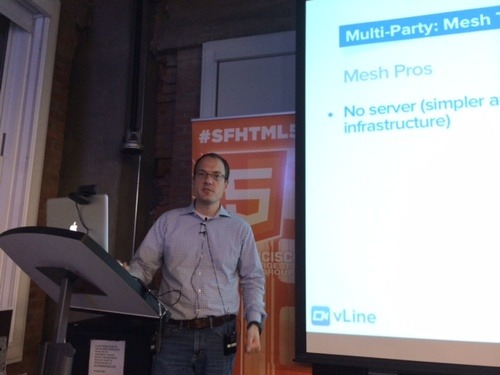
At the SFHTML5 All About WebRTC MeetUp earlier this week (that’s our CEO, Ben Strong, speaking at the event), one question kept coming up: If WebRTC is peer-to-peer, why do you need STUN and TURN servers?

WebRTC needs to work 100% of the time

WebRTC can be the communication promised land. What could be better than peer-to-peer video, audio, and data connections based on open source code?

Many developers have built WebRTC applications without STUN or TURN servers. And they work well. Most of the time. It’s the “rest of the time” that makes people take pause. Unless you know your WebRTC solution works in ALL situations, it’s hard to rely on it as your go-to system.

This is where the servers come in.

Connecting across networks? You’ll need a server.

WebRTC works brilliantly when connecting browsers within the same local network. But as soon as you start reaching outside your network – into a corporate firewall, for example – you’re going to need a little more, well, firepower.

Firewall configurations won’t let WebRTC in without using the STUN (Session Traversal Utilities for NAT) or TURN (Traversal Using Relays around NAT) protocol. This is why you’ll need a server.

STUN attempts to poke a hole in the firewall so your call can go through. This protocol does the trick a lot of the time. If a connection is made using STUN, you’ve established a peer-to-peer connection. This is great because a STUN-based connection is not CPU or network intensive for the server.

When STUN isn’t enough, the TURN protocol is required. When TURN is used, the connection is relayed through the server and it’s not peer-to-peer. The relayed connection uses both network and processing power on the server, which limits the number of connections that can be handled on a single server at one time. (And if you need a lot of connections, you’ll need a lot of servers.)

How does the system determine what’s needed?

ICE is the protocol followed for determining which path to use, from the least complicated: the host, used when the WebRTC connection is on the same local network, to progressively more complicated: STUN then TURN protocols, both of which require servers.

OK, so I need a server. What now?

If you’ve decided you want to use WebRTC and 100% reliability is what you need, you’re in server territory.

What’s important to consider when you think about your servers? We think you should have three priorities:  

  1. Latency
  2. Backup and redundancy
  3. Load-balancing (network and CPU)

Several paths are available to build out your server infrastructure. Your appetite for which is best for you depends on your development skills, time, and budget.

Option one: AWS. Many details about using AWS, including some pricing implications, are outlined in our June post, Tunneling WebRTC over TCP (and why it matters). One thing to note about AWS is you can select your own priorities around latency and redundancy.

Option two: Open source TURN server. (One example can be found here.) Many purists determined to build their own solution will consider this path. It becomes your job to get the servers running in locations with low latency to all users (geographically distributed) and to make sure those servers can scale to handle the load.

Option three: vLine for developers. We’ve spent over two years focused exclusively on creating a WebRTC platform that works. 100% of the time. For those of you looking to add WebRTC-based functionality to your site, but want to spend your resources on the rest of your business – not keeping pace with the rapidly evolving WebRTC arena.

One quick way to get a sense of the quality of our platform is to use vLine link, which is based on the same global platform you can use for your solution.

We’re always happy to field questions. Please email us at [email protected] or find us @vlineinc.

Introducing vLine link: Free, simple WebRTC video chat

vLine has been leading the WebRTC charge for two years with our platform, vLine for developers, that makes it easy to add video chat to any website.

Today, we are thrilled to announce vLine link, which lets you create your own free video chat link that can be used with anyone, anytime, anywhere.

Copy. Paste. Video Chat. It’s that simple to get your vLine link up and running. In under a minute you can be video chatting. When you reach out to someone, all they have to do is click the link.

There are many ways to use your vLine link. Here are just a few: 

  • Create a team meeting room
  • Reach out to a customer
  • Add it to a meeting invite
  • Call your mom

vLine link complements vLine for developers, our WebRTC platform that lets you add video chat to your site.

We’d love to hear what you think about vLine link. Reach out to us at [email protected] or @vlineinc.

vLine Wins Audience Choice and Best Conferencing Awards at WebRTC Expo

One of the toughest decisions you have to make as a startup is how much time and effort to spend building your product vs. promoting it. For most of the last two years, we decided to remain laser focused on the building side of things. 

As a result, when we showed up at the WebRTC Expo in Atlanta last week, a lot of people in the WebRTC community hadn’t heard of us. That made it all the more rewarding to leave the conference with both the Audience Choice Award, which was awarded based on voting from conference participants, and the Best Conferencing Award, which was awarded by a panel of judges to the best multi-party conferencing solution.

If you missed the conference, you can check us out in the following videos (courtesy of TMCNet):

And thanks to everyone who stopped by our booth and snagged a #webrtcisready t-shirt. We met a lot of great folks and look forward to continuing all those conversations.

GitTogether: Video Chat for GitHub (powered by WebRTC)

tl;dr

  1. Go to https://gittogether.com and login with GitHub.
  2. See people you follow on GitHub plus members of your teams and organizations as contacts.
  3. If the people you want to talk to aren’t online or aren’t in your contact list, send them your GitTogether url (https://gittogether.com/your-github-id).
  4. Chat away!

Background

It’s hard to know if your platform is any good until you’ve used it to build a real app, preferably one that you use yourself on a daily basis. So, when we first started developing the vLine platform and API two years ago, we also started building an app on top of it.

Since our lives basically revolve around GitHub, we decided to build a communications tool that does, too. We named it GitTogether, gave it a GitHub login, and populated the contacts list from the people you follow or work with on GitHub.

Fast-forward to today, and we have a robust app that we’ve been using internally as our primary communications tool for over a year. Since our main goal was to learn from the experience of building and using it, we never shared it very widely, but enough people have discovered it and found it useful that we figured we should finally spend some more time talking about it.

Over the next few weeks, we’re going to do a series of blog posts on how it works under the hood, what we learned from the process of building it, and how you can build apps that share the same capabilities. But in the meantime, enjoy!