Skip to content

vLine

Welcome Back: vLine Returns as a New Random Video Chat Platform

After more than 10 years, vLine is officially back — and this time, it’s built for everyone!

What started as a WebRTC-based real-time communication project has now evolved into a random video chat and live video chat platform designed for modern users. Today, we’re excited to introduce a new version of vLine — a browser-based experience that works instantly.

Built on WebRTC from Day One

vLine originally launched around 2011 as a WebRTC-focused startup, at a time when real-time communication in the browser was still new and largely experimental.

Back then, the goal wasn’t to build a chat for end users — it was to create a technology platform that helped developers integrate video, messaging, and presence features into their own applications.

The project focused on solving real technical challenges:

  • low-latency communication
  • peer-to-peer video connections
  • browser compatibility
  • scalable real-time infrastructure

While the market wasn’t fully ready at the time, this early work built a strong technical foundation.

From Technology to Random Video Chat

The way people use the internet has changed. Users no longer want to build tools — they want to open a website and start talking immediately.

That’s why vLine has evolved into a random video chat platform, where users can connect instantly with others around the world.

Real-Time Communication Made Simple

The new vLine is designed to make live video chat simple and accessible:

  • Fast and easy registration
  • No downloads
  • No complicated setup

Users can get started in seconds and begin a real-time conversation with minimal friction.

Powered by WebRTC and backed by years of infrastructure experience, vLine delivers smooth and stable communication across all modern devices.

Why vLine Now?

Many existing platforms struggle with outdated systems and inconsistent performance. vLine takes a different approach by focusing on browser-based live video chat powered by WebRTC.

This allows for faster connections, better stability, and a more seamless experience for users.
vLine has joined Airtime

We are excited to announce that vLine has joined the Airtime team. When we first met Sean Parker it was clear he had a vision that resonated with ours: that the proliferation of smartphones and increasing network bandwidth and coverage provide the foundation for  a world where real-time video will give rise to new ways of communication and experiences.

Since joining Airtime, we have been working on building out a  globally distributed WebRTC platform optimized for mobile devices and networks that powers the Airtime application. Building scalable real-time multi-party video chat is quite challenging. Unlike simple streaming applications that can tolerate latency on the order of seconds and leverage existing content delivery networks, our network has to provide latency on the order of milliseconds so that people anywhere in the world can hold intelligible conversations. We have made much progress towards this goal, but we have more to do and exciting ideas on how to further improve. If you are interested in complex technical challenges and want to help us push the boundaries of real-time communication, we are hiring.

We thank you for using vLine and being our customers. We value your privacy and will be deleting all vLine customer data permanently. We hope to continue creating compelling products and experiences for you as part of Airtime.

Please check out the Airtime app. Comments or questions? Send us a note at [email protected]. We’d love to hear from you.

Deprecating the vLine Developer Platform

As of Nov 26, 2014 , we will no longer be accepting new developer signups. Our  existing developers will still be able to sign in and continue using the service through May 2015. vLine API services will continue to run for the next 6 months, to allow for developers to transition away from the platform. If you have technical questions you can continue to reach us at [email protected]. The vline.com link-sharing application will continue to work.

At vLine, we pride ourselves on offering a product that always works. Building a platform is a huge undertaking. Building for web and mobile, running a highly scalable backend, working on well-designed APIs and providing support to our customers takes a lot of time and resources. Unfortunately, our  limited resources don’t currently allow us to  give each of these areas the kind of focus we want. As a result, we have decided to deprecate our platform APIs and re-focus on an application.

We very much appreciate the feedback and support we’ve received from our developer partners, and we hope to have your continued support as we reveal more details about what we are working on over the next few months; please stay tuned for updates.

The Democratization of Real-time Video Conferencing

Today, a video call means something a little different to everyone. Some think Skype, Facetime or Google Hangouts. For others, it’s WebEx or GoToMeeting. Those working in corporate environments might think of expensive, fancy telepresence conference systems in specialized conference rooms. In each case, some mix of pre-arranged relationships, downloads, specialized equipment or a lot of cash are required.

At vLine, we think a video call means making one click. That’s it. We believe video calls should be simple, fast, and affordable. WebRTC is the catalyst for democratizing video calls and vLine is at the forefront of making video calls accessible to all.

The vLine Telepresence System

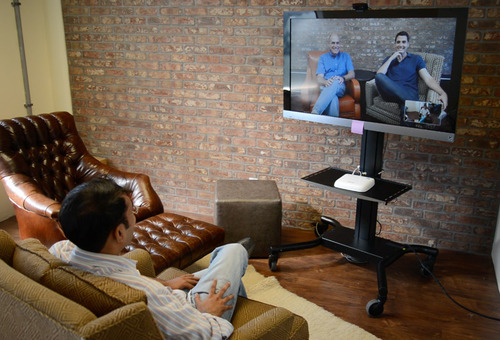
The picture above illustrates one example of why we think video calls are on the path to ubiquity. It’s our high quality, reliable telepresence system that connects our office with anyone who wants to start a video call. It uses 3 pieces of hardware and our free vLine link service.

As you can see, this system is not a fancy telepresence system that costs hundreds of thousands of dollars but rather a bookmarked vLine link in the browser that runs all day overlooking our work area. Anyone working remotely can hop in and out any time they want to communicate with the office.

There are three reasons we think this set-up is an indicator of the great things to come for video calls:

1. Easy to use. We send someone a link and they are instantly connected.

2. Affordable to deploy. Total cost of this system: $1117.93. The parts include:

3. Plug and play. No fancy degrees required.

We recently had a visit from a representative at a top carrier who was blown away by the quality of our platform, including our telepresence system described above. “It just works,” he said. This was high praise and the reaction we aim for with our offering.

We are already seeing vLine users in the real world starting to use the vLine link as an always-on conference room. This is a great example of a use case that was not imaginable or possible before WebRTC and the democratization of real-time video calls.

Do you have other novel ideas for ubiquitous real-time video? Leave a comment or reach out to us at [email protected] or @vlineinc.

WebRTC for mobile and group conferencing

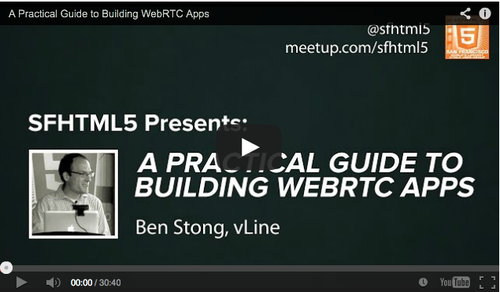
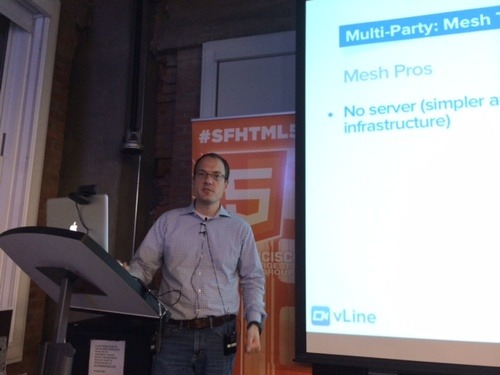
Packed into Yelp headquarters on Wednesday, October 9, attendees of San Francisco’s HTML5 Meetup heard our CEO and co-founder, Ben Strong, dive into the state of WebRTC for mobile and group conferencing. Now you can hear about it, too, in this video of his thirty-minute presentation.

A few teasers…

When it comes to mobile WebRTC, support was added in Chrome 29 and Firefox 24 for Android. Apple only allows browsers on iOS to use the mobile Safari engine, so Chrome for iOS does not yet support WebRTC. But there is a work around – embed your WebRTC in your application.

One big question developers face is whether to build an HTML5 WebRTC application for the browser or build it as a native mobile app. There are benefits – and tradeoffs – to either path. Taking into account the differences between devices is one of the most challenging aspects of mobile WebRTC. Most mobile devices are not as powerful as laptops (of course, there are exceptions in both directions), and spending time understanding how WebRTC adapts to various network environments is critical to creating a desirable experience.

Before moving on to group conferencing, Ben shares insights about the plethora of devices on the market today that are “not quite mobile,” but can leverage WebRTC to make it into a high end telepresence device (think fancy Cisco installation at a fraction of the price).

Support for group conferencing is an ongoing quest in the land of WebRTC. Ben dives into your options when it comes to supporting multi-party connections. Live demos illustrate the differences between a mesh (every peer connects to every other peer) versus star (all feeds are streamed through a central server) configuration. The tradeoffs are analyzed.

Ben wraps up with a handful of considerations for UI configuration.

Let us know what you think and, as always, if you have any questions, let us know @vlineinc or [email protected].

WebRTC: If it’s P2P, why do I need a server?

At the SFHTML5 All About WebRTC MeetUp earlier this week (that’s our CEO, Ben Strong, speaking at the event), one question kept coming up: If WebRTC is peer-to-peer, why do you need STUN and TURN servers?

WebRTC needs to work 100% of the time

WebRTC can be the communication promised land. What could be better than peer-to-peer video, audio, and data connections based on open source code?

Many developers have built WebRTC applications without STUN or TURN servers. And they work well. Most of the time. It’s the “rest of the time” that makes people take pause. Unless you know your WebRTC solution works in ALL situations, it’s hard to rely on it as your go-to system.

This is where the servers come in.

Connecting across networks? You’ll need a server.

WebRTC works brilliantly when connecting browsers within the same local network. But as soon as you start reaching outside your network – into a corporate firewall, for example – you’re going to need a little more, well, firepower.

Firewall configurations won’t let WebRTC in without using the STUN (Session Traversal Utilities for NAT) or TURN (Traversal Using Relays around NAT) protocol. This is why you’ll need a server.

STUN attempts to poke a hole in the firewall so your call can go through. This protocol does the trick a lot of the time. If a connection is made using STUN, you’ve established a peer-to-peer connection. This is great because a STUN-based connection is not CPU or network intensive for the server.

When STUN isn’t enough, the TURN protocol is required. When TURN is used, the connection is relayed through the server and it’s not peer-to-peer. The relayed connection uses both network and processing power on the server, which limits the number of connections that can be handled on a single server at one time. (And if you need a lot of connections, you’ll need a lot of servers.)

How does the system determine what’s needed?

ICE is the protocol followed for determining which path to use, from the least complicated: the host, used when the WebRTC connection is on the same local network, to progressively more complicated: STUN then TURN protocols, both of which require servers.

OK, so I need a server. What now?

If you’ve decided you want to use WebRTC and 100% reliability is what you need, you’re in server territory.

What’s important to consider when you think about your servers? We think you should have three priorities:  

  1. Latency
  2. Backup and redundancy
  3. Load-balancing (network and CPU)

Several paths are available to build out your server infrastructure. Your appetite for which is best for you depends on your development skills, time, and budget.

Option one: AWS. Many details about using AWS, including some pricing implications, are outlined in our June post, Tunneling WebRTC over TCP (and why it matters). One thing to note about AWS is you can select your own priorities around latency and redundancy.

Option two: Open source TURN server. (One example can be found here.) Many purists determined to build their own solution will consider this path. It becomes your job to get the servers running in locations with low latency to all users (geographically distributed) and to make sure those servers can scale to handle the load.

Option three: vLine for developers. We’ve spent over two years focused exclusively on creating a WebRTC platform that works. 100% of the time. For those of you looking to add WebRTC-based functionality to your site, but want to spend your resources on the rest of your business – not keeping pace with the rapidly evolving WebRTC arena.

One quick way to get a sense of the quality of our platform is to use vLine link, which is based on the same global platform you can use for your solution.

We’re always happy to field questions. Please email us at [email protected] or find us @vlineinc.

Introducing vLine link: Free, simple WebRTC video chat

vLine has been leading the WebRTC charge for two years with our platform, vLine for developers, that makes it easy to add video chat to any website.

Today, we are thrilled to announce vLine link, which lets you create your own free video chat link that can be used with anyone, anytime, anywhere.

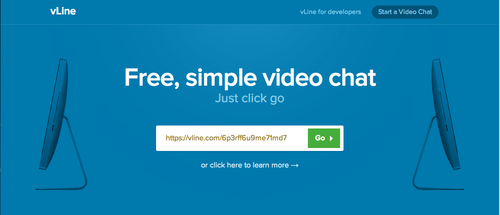
Copy. Paste. Video Chat. It’s that simple to get your vLine link up and running. In under a minute you can be video chatting. When you reach out to someone, all they have to do is click the link.

There are many ways to use your vLine link. Here are just a few: 

  • Create a team meeting room
  • Reach out to a customer
  • Add it to a meeting invite
  • Call your mom

vLine link complements vLine for developers, our WebRTC platform that lets you add video chat to your site.

We’d love to hear what you think about vLine link. Reach out to us at [email protected] or @vlineinc.

vLine Welcomes Engineering Gurus

We recently added a couple of powerhouse developers to our team. With their help, we’re excited to be able to turn out functionality you’ve been requesting a little faster.

Jesse Rabek has jumped in to drive our iOS development. His past has taken him through a wide range of projects, including embedded and mobile as well as web development and gaming. Jesse cofounded a startup in Venezuela and managed the driver team at (the late) Palm, Inc.

When he’s not mastering IOS for vLine and WebRTC, he’s probably off gaming, drumming, dancing, or hiking.  @JesseRabek

Jim Wong is currently focused on developing our multi-party conferencing capabilities. He’s steeped in startup experience, most notably on flexible and scalable client-server applications. Before joining us, Jim was an architect and director of engineering at SugarSync. He ran SugarSync’s team that was responsible for core sync features and building the infrastructure to support tens of millions of users and billions of user files. Bytemobile, an industry –leading optimization solution for wireless operators and Vosaic, a pioneering video streaming company in the late 1990’s are other notable startups in Jim’s past.

When not at vLine, Jim enjoys spending time with his wife and kids, playing basketball, and doing the bare minimum maintenance required to prevent his house from falling down. @james_d_wong

Live TV interview powered by vLine customer, In:Quality Media

vLine customers are driving innovation in their markets in part due to our WebRTC video and audio platform.

We recently heard from Kevin Leach, founder of In:Quality Media, a UK-based company that provides broadcasting equipment in the homes and offices of TV and radio contributors. Check out this example of how vLine is helping drive engaging, real-time connections.

From Kevin Leach:

On 22nd August we facilitated the world’s first live TV interview using WebRTC. We had spent the preceding months working with vLine to develop a browser-based app enabling live broadcast-quality streaming for our rapidly growing network of Remote Contribution Terminals.

Business analyst Louise Cooper appeared live on rolling news channel Sky News from her home-office, answering questions from the studio anchor on a breaking story about card-protection refunds.

In:Quality has opened new doors to connect experts to news stories. Our service allows them to appear on-air at short notice without the need to visit a studio or to have a live truck attend. A cost-effective internet-based streaming solution was required and has been developed using vLine’s unprecedented WebRTC experience and infrastructure.

WebRTC has huge potential for the broadcast industry thanks to its native high quality, low-delay codecs and its ability to be decoded in any studio with a compatible browser. Traditionally, dedicated hardware and infrastructure has been necessary to achieve the same result, the cost of which has been prohibitively expensive. In some locations we’re reliant on ADSL connections with limited upload, but thanks to the efficiency and flexibility of the OPUS codec, we’re still able to achieve good quality wideband audio.

Our Remote Contribution Terminals (above) consist of a small form-factor base unit with prosumer USB webcam and microphone. We’ve had a piece of bespoke software built to control the exposure, focus etc. We use remote access software to manage the equipment remotely so that the interviewee just switches the power on – we do the rest. There’s no need for a local screen, keyboard or mouse which helps reduce clutter, costs and the environmental impact.

WebRTC Digest – Week of 8/26 – Hangouts VP8, WebRTC Camp, Mozilla TinCan

Hangouts Moves to VP8

Google is converting their Hangouts plugin to use VP8 instead of H.264 as a first step in eventually moving Hangouts to use WebRTC. This is significant because it shows their commitment to VP8 and means that we can expect them to continue to push device manufacturers to include the free VP8 hardware encode/decode RTL for high-performance, low-power on mobile.

WebRTC Camp

If you’re interested in learning more about WebRTC, check out the WebRTC Camp taking place on October 20 in Portland, Oregon. The event will be held the day after the Realtime Conference, so you can attend both.

Mozilla TinCan

Mozilla is building a WebRTC demo that uses Persona for authentication called TinCan. The code is on GitHub and you can watch a video demo here: https://mozilla.hosted.panopto.com/Panopto/Pages/Home.aspx.