Skip to content

Uncategorized

vLine Wins Audience Choice and Best Conferencing Awards at WebRTC Expo

One of the toughest decisions you have to make as a startup is how much time and effort to spend building your product vs. promoting it. For most of the last two years, we decided to remain laser focused on the building side of things. 

As a result, when we showed up at the WebRTC Expo in Atlanta last week, a lot of people in the WebRTC community hadn’t heard of us. That made it all the more rewarding to leave the conference with both the Audience Choice Award, which was awarded based on voting from conference participants, and the Best Conferencing Award, which was awarded by a panel of judges to the best multi-party conferencing solution.

If you missed the conference, you can check us out in the following videos (courtesy of TMCNet):

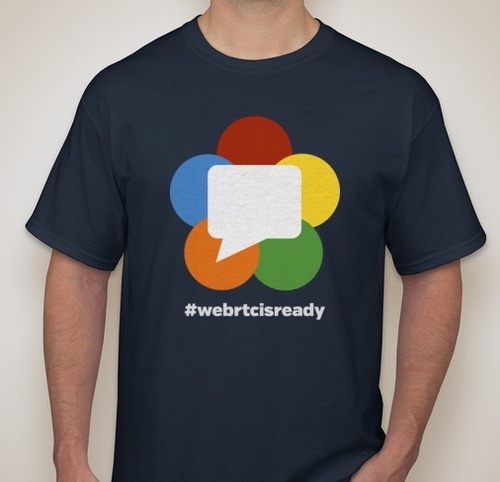
And thanks to everyone who stopped by our booth and snagged a #webrtcisready t-shirt. We met a lot of great folks and look forward to continuing all those conversations.

WebRTC Digest – Week of 6/24 – WebRTC Conference Highlights and WebKit

WebRTC Conference Atlanta

This past week was the WebRTC Conference in Atlanta, Georgia. Vendors, customers, and people interested in learning about WebRTC gathered for three days of presentations, discussion, interviews, and demos (day one and day two). On the last day of the conference, judges handed out awards in several categories.

Some of the attendees wrote up summaries of the expo from their perspectives. Chris Koehncke, Director of Business Development at Genband, is convinced that WebRTC is not just another “feature”:

WebRTC is a difficult concept for the average programmer to wrap their head around and we, as the industry pundits, need to work to work on this. It’s not time to sell, it’s time to educate.

Tsahi Levent-Levi, one of the moderators for the WebRTC panel called “The Hype Cycle”, wrote about his thoughts on the conference and came to the conclusion that WebRTC is ready because

There were real products with real end customers using it already, which to me is a validation of the need

WebKit

The WebKit development mailing list had a post from Danilo Cesar, Software Engineer at Collabora, where he mentioned that

A few colleagues and I are working on the getUserMedia/PeerConnection API for the Gtk port.

KDE Core Developer and Senior Software Developer at Digia, Allan Jensen, replied later in the thread with

I know of a company working on WebRTC for QtWebKit. They want to upstream it, but I do not know the current status or timeline.

WebRTC Digest – Week of 6/17 – WebRTC Tutorial, Skype, and VP9

WebRTC Overview and Tutorial

Cullen Jennings, RTCWeb co-chair, gave a nice WebRTC overview and tutorial at INET Bangkok. A video of the presentation has been posted. It’s about 80 minutes and gives both a general overview of WebRTC, as well going into some of the technical details.

Skype Architecture

In response to a mailing list post, Principal Skype Architect Matthew Kaufman, went into some of  the reasons that Skype transitioned from a peer-to-peer model to a server-based “dedicated supernode” model. One reason for the switch was the unreliability of the supernodes, which were primarily Windows machines:

This proved to be a problem when not once, but twice a global Skype network outage was caused by a crashing bug in that client… bootstrapping the network back into existence afterwards was painful and lengthy

The other issue highlighted was the increasing prevalence of mobile devices:

The Skype peer-to-peer network, and many of its functions (such as instant messaging) was built for a world where almost every machine is powered by a wall socket, plugged into broadband Internet, and on for many hours a day.

VP9 in Chromium

Support for the VP9 codec, the successor to VP8, was enabled by default in Chromium. It’s not yet available to use as a WebRTC codec, but we can’t imagine that it will be too long before it is.

WebRTC Digest – Week of 6/10 – Mozilla, CubeSlam, and WebRTC Conference

Mozilla

Mozilla announced their “Talkilla” project (source on GitHub), which will

… allow users to communicate in real time as they browse the web, and offer tools to share their online experience. Additional Service Providers will be expose their services, for example, dialing out and receiving calls from the telephone network.

Also, Mozilla is requesting help testing Firefox’s WebRTC implementation this Friday (June 21):

We would like for you to use the new version of Firefox on your Android phone and desktop or laptop machine, and take a close look at the latest Nightly builds in order to assist us in identifying any noticeably major issues found with our WebRTC implementation, and ensure that all feature functionality that is included in this upcoming release is on its way to a feature and testing complete state.

CubeSlam

Google launched a fun Pong clone called “CubeSlam” that utilizes the WebRTC data channel. Try it out at cubeslam.com and check out the source code on Google Code.

WebRTC Conference and Expo

We’ll be in Atlanta next week for the WebRTC Conference and Expo. Be sure to drop by and say hello at our booth (#81). We have one free pass to the conference available, so the first person to send us a note at [email protected] will get it!

WebRTC Digest – Week of 6/3 – IE, Hype, and Security

WebRTC in IE?

A blog post and some tweets from a Microsoft developer conference seemed to suggest that Microsoft is making progress on WebRTC in IE (at least in the context of running Lync without a plugin). There appear to be no details on whether it is CU-WebRTC, vanilla WebRTC, or something else entirely.

Hype Recheck

While Cisco continued to re-blog last week’s “The Reality of WebRTC… All Hype?” article several times, Tsahi Levent-Levi posted a rebuttal stating:

WebRTC is the most disruptive technology in VoIP to date. Not because there’s new technology in it, but because it enables new use cases to be implemented.

Security and WebRTC

Recent news spawned a discussion about WebRTC security and privacy. Chrome WebRTC Team Lead Justin Uberti shared a post, written by Mozilla employee Adam Roach, that provides a nice overview of the issues: “WebRTC: Security and Confidentiality”. Cullen Jennings, Cisco employee and RTCWeb co-chair, was one of many contributors to a recently written report outlining the dangers of adding wiretap endpoints to Internet services.

Tunneling WebRTC over TCP (and why it matters)

A couple of weeks ago, we quietly turned on support for dual-sided TCP tunneling in the vLine Cloud, becoming the first WebRTC infrastructure provider to support connecting through firewalls that block UDP. This may not sound interesting or important, but it actually makes the difference between having a service that “usually connects” and one that “just works”. Let us explain:

One of the many great things about WebRTC is that it’s relatively easy to get started. Bring up an instance of the apprtc backend for signaling, copy and paste some JavaScript, and, voila, you’re making video calls in your app (actually, it’s a little harder than that, but a good web developer can easily have demoable video chat up and running in a day or two).

Unfortunately, the road from demo to production-grade service can be more challenging than you might expect (and more expensive!). Here’s how it usually goes: 

Level 1: STUN

You start by making your first few calls over a local area network, and everything works great. Hooray! Then you try to make a call to someone outside your firewall, and one of two things will happen.

1) If you happened to copy and paste the address of Google’s STUN server from the apprtc source code, your call will go through, and you’ll be a happy camper (though you may have some lingering doubts about whether it’s ok to use an undocumented service that Google has not given third party developers explicit permission to use. Note the silence from Google on this thread).

2) If you don’t have a STUN server configured, your call will fail. A little research will reveal that STUN is a protocol that the browser uses to determine its public IP address and poke a hole in the firewall. So, if you want to connect through a firewall, you’ll need a STUN server.  A few hours later you have an open source server up and running on EC2. A small instance should do just fine ($43.92 per month), but you’ll probably want to run at least two of them for availability, preferably in different regions (make that $87.84 per month).

Level 2: TURN

You do a few more test calls, and they all work. Things are looking good. Then you try to make a call between two corporate networks, and it fails. Grrr. While you were researching STUN, you read about another protocol called TURN that’s used to relay data in cases when the browser can’t establish a peer-to-peer connection. You weren’t sure if it was strictly necessary, but some more research reveals that STUN is only sufficient for connecting about 80% of calls. If that’s not enough for you (and it probably isn’t), you’ll need a TURN server.

A few mailing list threads later, and you’ve got a TURN server up and running on your EC2 instance. Actually, the network throughput on a small instance can be pretty unpredictable, if anyone else is using your shared network interface, so you should think about getting a bigger instance. A medium instance ($87.84 per month) works pretty well, but for the most predictability and lowest jitter, you’ll want an extra large ($351.36 per month), which will get you “high network performance”. Actually, make that two ($703.52 per month), for availability.

Of course, since you’re relaying video, you’ll need to factor in the bandwidth costs as well. Base pricing on EC2 is $0.12 per GB. As you’re running the numbers on this, you may start to wonder what prevents someone else from using that public server you just set up and running up your bandwidth bills. Here’s a good mailing list thread on the subject. Summary: there’s not a great way to prevent this given the way the TURN protocol works and that the TURN credentials have to be present in your JavaScript, where anyone can find them.

But let’s not get caught up in the dollars and cents. You can now make calls to your friends at other tech companies. Awesome! Then you try to make a call to someone at a big, corporate, non-tech company, and it fails. Dad-gum. You thought TURN had you covered.

20 minutes later, after a little more research, you discover that Chrome’s TURN allocation implementation only supports relaying UDP packets. Chrome 28 will add support for allocating a TURN server over TCP, but the packets will still be relayed through UDP. Whoops, that still doesn’t solve your problem when the firewall blocks UDP traffic. 

Level 3: vLine Cloud

This is when our new TCP-tunneling support comes into play. It doesn’t rely on Chrome’s TURN implementation, so it works in Chrome today. Furthermore, it works even if both parties are behind firewalls that block UDP. All that’s required is access to the internet over port 443 (the HTTPS port), which the vast majority of firewalls allow.

You don’t need to do anything special to enable TCP tunneling in your vLine service. Just use vline.js to build your app, and we’ll connect using the best available method for any given call. We run a highly-available global network of servers, so we’ll provide the best possible call quality to all of your users, anywhere in the world, even behind firewalls that block everything except TCP traffic over the HTTPS port. In case you’re wondering, we’re still doing end-to-end DTLS, so our servers never see your unencrypted media streams.

Our goal is a 100% connect rate. If you have a network where calls aren’t connecting, please let us know.

Note 1: If you want to test this yourself by blocking UDP on your firewall, remember to leave the DNS port (53) open.

Note 2: Some ultra-restrictive firewalls that do stateful packet inspection may still block connections since, even though the browser is using the HTTPS port, it isn’t actually doing SSL/TLS (we’ve never actually encountered a firewall like this in the wild, but they do exist). Chrome will soon support making WebRTC connections over TLS, at which point we will work through these firewalls, as well.
WebRTC + Chromebox = $400 HD Telepresence System

WebRTC Digest – Week of 5/27 – Flow Charts, FUD, and T-Shirts

Good in-depth explanations of WebRTC are still few and far between. Fortunately, Anant Narayanan of Firebase (and previously the WebRTC team at Mozilla) made a big contribution to the presentation-pool last week with his talk A Practical Introduction to WebRTC at Fluent Conference.

Be sure to check out the slides for the most complete set of WebRTC signaling flowcharts on the web (use the down arrow on slide 7). Seriously. if you want to understand what’s going on under the hood when you click “Start Call” in a WebRTC app, you need to read the flowcharts. We’ll wait.

FUDdy-duddy

WebRTC was top of mind over at No Jitter last week, with no fewer than three posts on the topic. Irwin Lazar of Nemertes Research led off with a positive piece titled WebRTC: Why Should Enterprises care?

Perhaps more exciting is the opportunity to give CRM or ERP applications their own voice/video applications directly embedded into their web interfaces […] Think about a team of people who live in a business process application all day who can chat, talk, or video chat with each other […] Again, here the opportunities are endless for application developers to extend rich communications and collaboration anywhere.

Then Laurent Philonenko, VP/GM of Cisco’s Clients and Mobility Business Unit rained on the WebRTC parade with The Reality of WebRTC…All Hype?

[…] WebRTC is not quite ready for prime time. Simply put, the standards are not done. Assume the WebRTC standards completion is still one year out, and that it takes six months for Chrome and Firefox to ship a browser with the final standards; plus add the time for people to upgrade their browsers. We’ll see early implementations before, but I’d say it’s two-plus years before this technology is widely deployed in the market.

Dave Michels closed out with WebRTC Hype Check, kindly explaining that there’s nothing to see here, and you folks should really just move along.

WebRTC is not disruptive. […] WebRTC does not offer new capabilities, nor significant cost savings over other peer-to-peer technologies. WebRTC could be more accurately described as an evolutionary technology–effectively bringing real-time capabilities to the browser instead of reliance on ad-hoc plugins and downloads.

We’re biting our tongues for now, but you can expect to hear more on this subject here on the vLine Blog. In the meantime, we’ll be polishing up the design on our new line of “WebRTC Is Ready” T-Shirts.

Seriously. Drop us a line if you’d like one.

GitTogether: Video Chat for GitHub (powered by WebRTC)

tl;dr

  1. Go to gittogether and login with GitHub.
  2. See people you follow on GitHub plus members of your teams and organizations as contacts.
  3. If the people you want to talk to aren’t online or aren’t in your contact list, send them your GitTogether url (gittogether GitHub).
  4. Chat away!

Background

It’s hard to know if your platform is any good until you’ve used it to build a real app, preferably one that you use yourself on a daily basis. So, when we first started developing the vLine platform and API two years ago, we also started building an app on top of it.

Since our lives basically revolve around GitHub, we decided to build a communications tool that does, too. We named it GitTogether, gave it a GitHub login, and populated the contacts list from the people you follow or work with on GitHub.

Fast-forward to today, and we have a robust app that we’ve been using internally as our primary communications tool for over a year. Since our main goal was to learn from the experience of building and using it, we never shared it very widely, but enough people have discovered it and found it useful that we figured we should finally spend some more time talking about it.

Over the next few weeks, we’re going to do a series of blog posts on how it works under the hood, what we learned from the process of building it, and how you can build apps that share the same capabilities. But in the meantime, enjoy!

WebRTC Digest – Week of 5/20 – Chrome 27, Temporal Scalability & Hardware Acceleration

Chrome 27

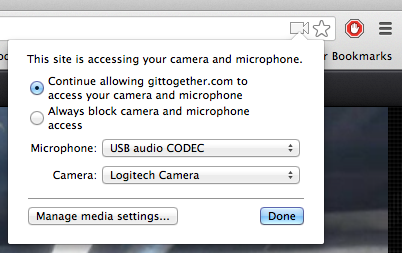
Chrome 27 was officially released. A list of WebRTC-related changes is available on the discuss-webrtc mailing list. One of the most visible changes as an end-user is the ability to select the camera and microphone from the “Omnibox” rather than digging through the Chrome settings.

Temporal Scalability

There was an interesting discussion on the mailing list about temporal scalability and whether controls for it could be exposed in WebRTC through SDP, especially for use with conferencing/mixing. Temporal scalability is a method of encoding a video stream in a format that lets you decode it at multiple frame rates (e.g., 30 FPS or 15 FPS) at the cost of increased encoding overhead. The LifeSize blog provides a nice description in the context of the H264 codec, and the WebM mailing list has a more detailed technical description of how it works in VP8.

Hardware Acceleration

VP8 hardware acceleration continues to be supported by more platforms as nVidia shows with this Tegra 4 demo of 1080p videoconferencing at 30 FPS. The Tegra 4 will have built-in hardware support for both VP8 encoding and decoding, with a stated goal of

Delivering the best WebRTC experience on Android, Chrome OS, and Google TV.